
Required reviews
If your default branch requires approving reviews or reviews from code owners, GitHub blocks every merge until someone approves. Auto-merge can’t merge those pull requests, so they wait for you.
To let PatchWave merge them, add PatchWave to the bypass list of the ruleset that requires reviews.
Put review rules in their own ruleset
Section titled “Put review rules in their own ruleset”A bypass skips every rule in a ruleset, so your default branch needs two rulesets: one that holds only review requirements, which PatchWave can bypass, and one that holds everything else, which still applies to PatchWave.
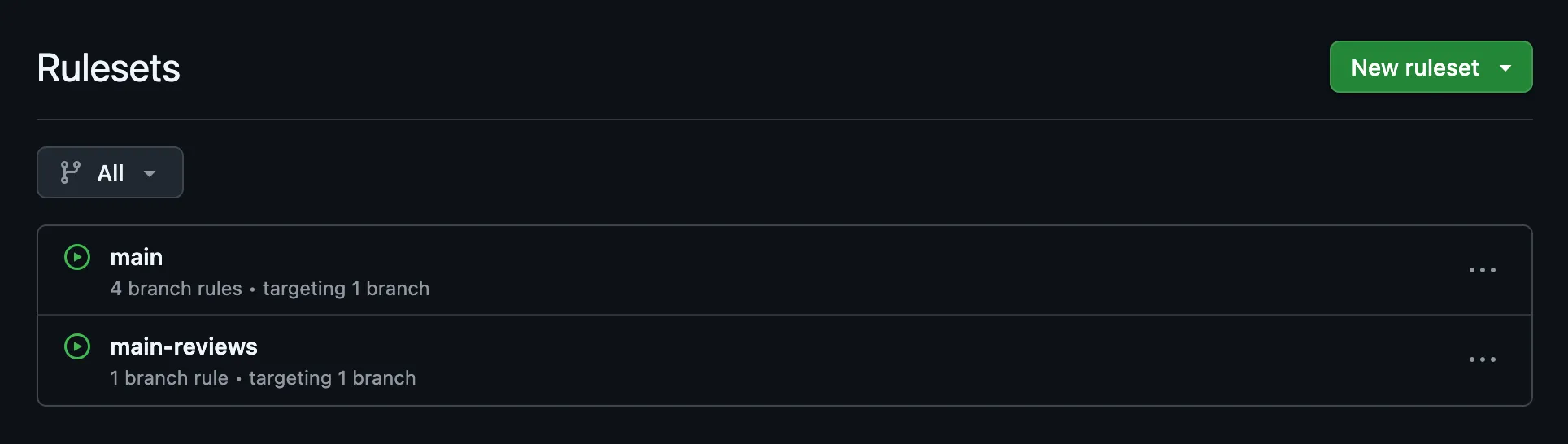
In this example, main-reviews holds the review requirements and lists PatchWave on its bypass list. main holds everything else.
| Reviews ruleset | Your other rulesets | |
|---|---|---|
| Rules | Require a pull request before merging, with required approvals, reviews from code owners or required reviewers | Require status checks to pass before merging and every other rule |
| PatchWave on the bypass list | Yes, for pull requests only | No |
The reviews ruleset can contain only these rules: Require a pull request before merging, Restrict deletions and Block force pushes. If it contains any other rule, PatchWave doesn’t use the bypass, and the pull requests wait for your review.
- In your GitHub repository, go to Settings → Rulesets and select New ruleset → New branch ruleset. For an organization-wide ruleset, go to your organization’s Settings → Repository → Rulesets instead.
- Under Target branches, add your default branch.
- Turn on Require a pull request before merging and set the required approvals and reviews from code owners you need. The bypass also skips this rule’s other settings. To keep a setting such as Require conversation resolution before merging in force for PatchWave, turn on Require a pull request before merging in your other ruleset with 0 required approvals, and turn the setting on there.
- Remove the same review requirements from your other rulesets and branch protection rules. GitHub applies every rule that matches a branch, so a review requirement left anywhere else still blocks PatchWave.
Add PatchWave to the bypass list
Section titled “Add PatchWave to the bypass list”- Open the reviews ruleset.
- Under Bypass list, select Add bypass and add the PatchWave app.
- Next to PatchWave, change Always allow to For pull requests only, then save.
With For pull requests only, PatchWave can merge a pull request without an approving review, but it can’t push to your default branch directly. See GitHub’s guide to granting bypass permissions.
What still needs a person
Section titled “What still needs a person”PatchWave still merges only pull requests that pass its checks and match your policy. Before it skips a review, every status check your rulesets require must have passed. It doesn’t merge over a review that requests changes, and you still approve each fix PatchWave writes before it merges.
The bypass covers every file, including paths in your CODEOWNERS file. If every change to a repository needs a human review, leave auto-merge off for that repository instead.
Stuck? Email support@contextbridge.ai and a human will help.